

By David Danto and Andrew W. Davis
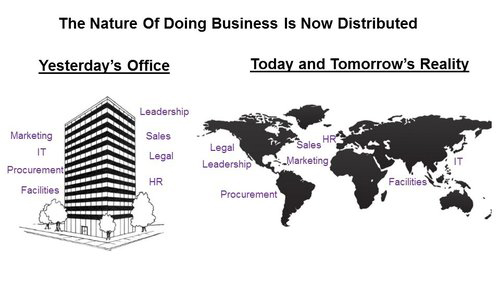
The year was 2006. Videoconferencing had been used in the corporate world for more than ten years — and everyone hated it. It failed to meet the promises of reducing travel costs and providing easy, “just like being there” experiences. Enterprise AV was really no better. Huge boardrooms and over-complicated large conference rooms were the norm, with most requiring an AV or IT technician to operate. Into this mix, Cisco inserted the concept of immersive “TelePresence” — easy to use, single purpose, high-definition rooms that finally provided the desired experience. Every enterprise executive seemed to love them — except the ones in the finance department. Despite expert advice about the limitations, these rooms — costing upwards of a half-million dollars each — took off like wildfire. Now, just about 10 years later, it would be difficult to find any of these immersive rooms still in operation at most enterprises. Additionally, anecdotal data suggests the number of over-complicated, custom AV rooms has also shrunk significantly. The high costs did help sink these models, but that alone wasn’t the biggest factor in the pendulum swinging back to smaller, simpler systems. The truth is that nature of business changed

What are Huddle Rooms?
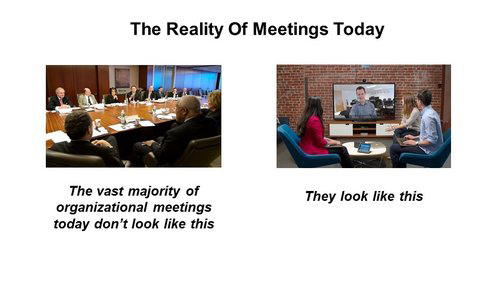
A huddle room is a space where small groups of people (generally fewer than six) can go to have meetings away from the noise and activities of today’s typically dense open office environments. Depending upon organizational culture, these spaces may or may not have walls (huddle spaces vs. huddle rooms) and may or may not be intended primarily for impromptu meetings. The majority of these huddle rooms are equipped with basic, simple to operate technology to support local presentations and collaboration with remote individuals. Everyone seems to agree that these rooms should be able to function under the control of the average user — and not require assistance from an IT or AV technician. Simplicity is the overall theme. What isn’t agreed upon, however, is what features constitute “basic” requirements.
Some organizations believe a speakerphone is enough, with or without a shared display. Others consider some form of videoconferencing to be a requirement. Further confusing the discussion is the fact that a wide variety of manufacturers have introduced a plethora of solutions that describe a huddle room in terms of only their own products. Today’s offerings run the gamut from repurposed older modalities to new products that were created just to serve the huddle room paradigm.
It’s easiest to envision huddle room solutions along a spectrum, each with different features and approaches.
Each of the possible huddle room solution types has a number of variables, and each has significant pros and cons.
Classifying the Types of Huddle Room Systems

Each of the possible huddle room solution types has a number of variables, and each has significant pros and cons.
Simple Rooms
It’s generally agreed that the most basic huddle space has a content display of some type and a telephone of some type. Smaller “quiet rooms” may have only a desk with one or two chairs and a tabletop display. Larger spaces may have a wall mounted flat-panel display and a speakerphone on a table with up to five or six chairs. Getting a person’s content onto the display can be accomplished by something as simple as a cable strung over to the table or as complex as any number of wireless content sharing applications and devices.
While these simple rooms meet the need for small, local groups of participants, they are typically not equipped to support collaborative meetings with remote participants effectively. People may bring their own notebooks and use them to join a meeting, but when using only a personal device to support even a small meeting room the results are typically less than satisfactory — with poor camera shots and unacceptable audio.
BYOD Rooms
- Audio Peripherals: A person’s PC can be turned into a very effective IP speakerphone by using a portable USB device. Some great examples of these include the Yamaha YVC-1000 or the Plantronics Calisto 600 Series. These provide excellent bidirectional audio in a small form factor for a relatively low price. If a more permanent audio device is desired, available solutions would include the Biamp Devio, which requires permanent installation and can also pass-through display signals.

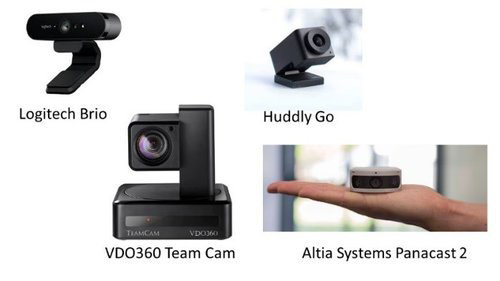
- The most basic feature of a good huddle room camera is that it has a much wider pick-up angle than a typical webcam — with a 90-degree field of view being typical for a camera considered appropriate for this application. Cameras specifically designed for this application include Logitech’s Brio – which (for about $200) produces 4K ultra high-definition, HDR (High Dynamic Range) images in a field of view that is adjustable from 65 degrees to 90 degrees, and Huddly’s Go (with an innovative ability to correct ultra-wide images into distortion-free shots.)
- If a mechanical PTZ camera is desired (so that a user can focus on one specific spot, or move around to multiple specific spots) VDO360’s Team Cam is a good choice. It is inexpensive as far as PTZ cameras go (about $400), but it is built specifically for these huddle room applications — with the requisite 90 degree field-of-view.
- There are also next-generation cameras available for the huddle room which have the ability to determine how many participants are in a room and automatically frame-up an ideal shot. This “intelligent tracking” feature will likely be the norm going forward, but it is available today on a standard USB camera with Altia System’s Panacast 2 – which (for about $1k) offers panoramic 180 degree 4K views with HDR.
- Combined Audio and Video Peripherals: Some manufacturers are now building devices that combine audio and video capabilities. These appear in many form factors.
- Some look like traditional offerings combined into a single package. The Logitech Group (for about $1.3K) includes a traditional PTZ camera, a center-of-table speakerphone with optional puck microphone extensions, on-device and handheld remote controls, and needs just a single USB connection to a host.

- Next-generation technology is emerging in this category as well, in the form of start-up Owl Labs’ new Meeting Owl. This is a Center of Table camera / speakerphone that more resembles Amazon’s Echo than a video conferencing peripherals. It has an innovative 360 degree camera that finds the people who are currently (or were recently) speaking and creates a close-up of just their images (under a strip with all the meeting participants’ around the table.) The company has yet to fully ramp-up production of these (approximately $800) units, so the jury is still out on them, but the intelligent tracking shown again here is sure to be of great interest.
The general benefits of BYOD systems include:
- Because the user is bringing his or her own codec engine, the cost to the enterprise of deploying a huddle room system is reduced compared to installing dedicated conference room solutions.
- Meeting hosts will likely use a conferencing application or service that they already use in their own workspaces. Hence, they are familiar with the software and likely need little or no additional training.
- A natural byproduct of this implementation is that the meeting participants have all their files with them already on their computers or tablet devices. No need for special downloads or uploads.
Drawbacks include:
- Using a BYOD strategy, the compute engines can’t be centrally managed at an enterprise level. If a PC has an issue (network connectivity, bad driver, security update causing conflicts, etc.) no one will know until the meeting has begun and the failure is experienced by the users. (This is the main reason that enterprises who have opted for installed room appliances avoid the BYOD model.)
- USB peripherals in the conference room are portable and easily misplaced or misappropriated.
- BYOD devices must have easy access to drivers for huddle room peripherals unless they use standard drivers. Meeting hosts may need to select the particular peripherals from a menu system – i.e. use the huddle room camera instead of the embedded camera.
- Some enterprises use a BYOD model without adding appropriate peripherals. Expecting a PC’s embedded camera, microphone and/or speakers to meet the need or installing a webcam designed to work at a desktop (with a nominal 12” distance for good images) are common mistakes that lead to poor quality meetings.
Hub Based Rooms:

- Crestron Mercury – an all-in-one tabletop solution that supports audio calls, AV presentation, and video conferencing (via built-in speaker and microphones and an included USB camera.) The device is a full open SIP conference phone that directly connects many popular VOIP calling platforms, and is able to connect directly to Skype for Business (MS Teams) and Zoom video conferences. (All other services require a BYOD device for connection.) It also pairs – via Bluetooth – to mobile devices and supports presentations via HDMI and Air Media. Mercury can be registered for reservations via Exchange or G-suite.
- Polycom Trio – the latest successor to Polycom’s Iconic “starfish” speakerphone, but with many additional features. It sports a “smartphone-like” UI as it connects to Microsoft’s Skype for Business and Office 365 for audio calls, video calls and content sharing.
- Conferencing Service Provider Platforms – some conferencing service providers – such as BlueJeans and Zoom – now offer hub based systems for their subscribers.
The general benefits of Hub Based systems include:
- As a permanently installed device, a hub based system can be remotely monitored for some health / availability information in an enterprise environment
- Without the variabilities stemming from devices being brought into the room, a more stable performance is a major benefit.
- Less “hook-up” and set up time is required as no peripheral connections are required. There is less risk to meeting delays.
The general drawbacks of Hub Based systems include:
- Videoconferencing capabilities are usually restricted to calls on one or two locked-in systems/platforms. For example, the hub may present only the option to start a Skype or Zoom call; other options would require an attached notebook.
- Often the hub manufacturers arbitrarily restrict compatible video cameras to a very small list of low-end devices. Despite having a standard USB port for camera input, their software prevents the use of better, more feature rich cameras. They are likely trying to convince users that want better images to purchase a more advanced system than a hub.
- Where offered, the management platform for some hub systems is sometimes different from the management platform used on larger systems. Organizations that want a blend of small hubs and large systems may have to use two management consoles to monitor all systems.
All In One Rooms:
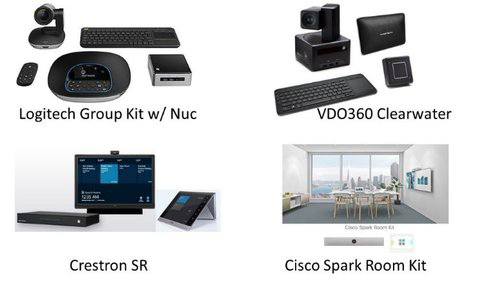
- Peripherals based system with added general compute engine – Some manufacturers take their BYOD type peripherals, add a compute engine for videoconferencing and audio processing, and sell them as a complete system. One example of this is Logitech’s Group Kit – complete with a small Intel NUC computer. Another is VDO360’s Clearwater system – where the PTZ camera is actually mounted on a small general purpose computer. These types of systems give you all the cost savings of a BYOD system but mitigate the connection and driver issues that arise from bringing the computer into the room each time.
- Control Device Wrapped Around A General Compute Engine – Some manufacturers take general compute based conferencing and add a touch panel for control and status, making the package seem like a complete room system. Skype Room Systems – like Crestron’s SR – do just that. It provides the same Skype for Business or Microsoft Teams UX that might be running on a laptop or mobile device, but built into a permanent, in-room engine. Users can get a familiar touch and feel in the form of a room system, but all wrapped around only the conferencing features of a PC application.
- Speakerbar with Appliance Codec – Many enterprises shun a general compute engine in their huddle rooms because of a perceived lack of stability, and actual lack of enterprise grade central monitoring. To gain those features, users look to manufacturers that make conferencing appliances – hardware codecs – for room use. These can still be minimal / simple installations as exemplified by Cisco’s Spark Room Kit. This unit is in the ‘speakerbar’ format for use under a display, containing the speakers, microphone array, intelligent tracking camera and in this case a dedicated videoconferencing codec (in a device that costs approximately $11K or approximately $3K plus an ongoing monthly fee.). The pros for such a system include the rock-solid performance and reliability along with the enterprise grade monitoring. The cons include the fact that it requires an infrastructure purchase, or a cloud subscription to function.
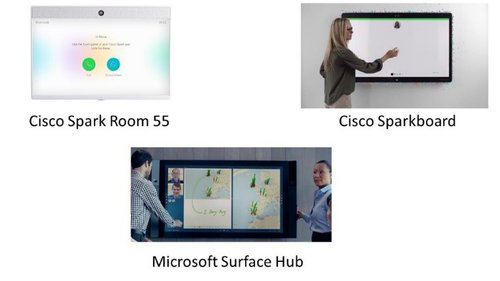
- All In A Single Display – Another product design is based on including the codec, audio and camera components within the display housing itself. A benefit with this approach is that you put up a display and you’re done – no additional peripheral devices or cable connections are needed. This All-in-One style is available as a standard display – like the Cisco Spark Room 55 – and interactive displays – like the Cisco Sparkboard and the Microsoft Surface Hub. These types of huddle room systems exhibit a certain elegance, with nothing to connect or attach, but they might have their drawbacks as well. Users need to ensure that they are clear on what infrastructure or licensing is required to operate them; what conferencing platforms, systems and/or software they are compatible with; how difficult they are to operate; and how good the images and sounds are that they produce. Not all single display systems are created alike, so end-users need to try them and speak with current users to understand any issues they’ve experienced.
- Complete, Multi-component Systems – Legacy videoconferencing manufacturers have a number of systems available that get ordered on a single SKU, get installed in hours and not days, only require power and a network port to operate, and perform splendidly in a huddle room environment. Cisco’s MX300G2 is one such system that can be unboxed, installed and making calls in less than an hour. Systems such as these provide the greatest ability to be remotely monitored within an enterprise, drastically reducing end-user issues. They often connect to a central management system that provides a dashboards and alarms. Of course, however, this usually means that organizations need to have purchased and installed these management systems as a prerequisite. Polycom’s Medialign Systems are another example of this type.
The general benefits of All In One systems include:
- Nothing has to be brought into the room for them to work. They are ready to go once someone walks in, and some of the systems can be remotely monitored because they are always connected.
- They generally eliminate the concept of system troubleshooting that legacy AV devices had. If there is any question about the condition of the equipment or any component then the entire system can be easily replaced. No programming, staging or compatibility checking is required.
The general drawbacks of All In One systems include:
- They are often more expensive than BYOD solutions
- They may require additional infrastructure components or costly services
Mini Full System Rooms:
These systems represent the custom AV Integrators’ response to the huddle room hype. The recommendation is to build a smaller custom designed, custom programmed, multi-component system using best-in-breed AV and collaboration components — just as was traditionally done in the AV model – but in this case done smaller.
The general benefit of Mini Full Systems is the specific ability to have the technology, user interface and displays customized to exactly what the end users require.
The general drawbacks of Mini Full Systems are plentiful:
- There is little to no cost benefit – each room still needs to be staged, assembled, and installed in the field. Only the custom programming can be repeated – and only to a certain extent.
- Patches and updates still need to be applied on a per component basis, with each component likely coming from a different vendor.
- In-room failures need to be remedied using traditional AV troubleshooting processes. The problematic component or cable needs to be identified, ordered and replaced – which can be a time-consuming process.
Trade-Offs
It is important to realize that there are inherent trade-offs for each of the huddle room solution types categorized above – and the trade-offs are not always evident. Can the system connect to all conferencing platforms you use? Will the camera deliver an adequate shot in your specific room? Is the system compatible with the cameras or other accessories you want to use? Is quality sacrificed for cost savings? Understanding the trade-offs and how they map into your organization’s collaboration needs is a crucial step to success. Independent technology consultants with experience across multiple platforms can provide valuable and cost-effective advice.
The Future
All the systems detailed above will continue to improve as technology advancements are brought to market. This is the nature of the electronics market. We can already envision a number of these improvements in price, performance, and feature sets.
- Voice First user interfaces (UIs) are now universally available on mobile smartphones and home devices. If you tell your phone or home device to “Call Helen” it places the call. That technology requires an always-on microphone connected to an AI engine in the cloud – which is a significant security issue for most organizations. (There are in fact conferencing services – such as Zoom – that offer this feature today, but it is often not permitted by enterprise compliance teams.) There is no doubt that the security issues can be overcome, and we’ll soon be able to start meetings just by asking.
- Meeting rooms will likely make more use of AI than just voice control. Room systems will be able to identify the people in the room (either by smart device proximity or facial recognition) identify the meetings scheduled on their calendars, obtain the needed presentation materials, and set all of it up to begin with a single request to “start my meeting.”
- Manufacturers are preparing to bring improved audio algorithms to the market. Audio performance has long been acknowledged as even more important than video in a video conference. With sketchy video, users will hang in; with unsatisfactory audio they simply hang up. Future speaker/microphone devices will likely be programmable to pick-up sounds from a specific distance that can be set. Depending upon the circumstances, huddle room walls may not be needed for sound isolation. Noise suppression and echo cancellation performance will continue to improve. Polycom has already introduced an “acoustic fence” feature that significantly improves audio performance in huddle room situations.
Final Thoughts
Whether you are an information worker in a large enterprise or an SMB, huddle rooms are likely to play a role your business communications future. IT professionals will need to wrestle with the myriad of technology choices available. Our advice to all readers is to start by assessing your actual user needs (not as easy as it sounds) and then identifying the best approach or approaches to meet those needs along with key concerns. The second step is to outline priorities – start by considering price, performance, ease-of-use, compatibility with already-deployed technology, training and adoption requirements and manageability. These will vary depending on the number of rooms you are considering, their location, your IP network bandwidth and other factors as well. The optimal choice may not be just one solution, but rather a blend of them.
Our guide above details the types of solutions that the different vendors have brought to market and our assessment of their strengths and weaknesses. Many of the solutions are sufficiently low cost that trialing them is a reasonable step. Be careful, however, not to expose large groups of end-users to systems that are being tested. End-user adoption is a critical component of a successful collaboration strategy, and confusing the users — or exposing them to technology they will not be using — is rarely a good step. Nothing good comes from showing users technology they will not like, or technology they did like but will not be using. We strongly urge organizations to decide upon a single strategy based upon actual user needs and go forward with it, deploying huddle room technology that is consistent with all of their collaboration experiences. This will create a stable and uniform user experience across any environment.
About the Authors


The co-founder of Wainhouse Research, Andrew has been reporting on the visual collaboration industry since 1994. He has published numerous reports, opinion pieces, magazine articles and newsletters and has presented at numerous industry events over the years.
David has over three decades of experience providing problem solving leadership and innovation in media and unified communications technologies for various firms in the corporate, broadcasting and academic worlds including AT&T, Bloomberg LP, FNN, Morgan Stanley, NYU, Lehman Brothers and JP Morgan Chase. David is the IMCCA’s Director of Emerging Technology and a noted industry analyst and consultant. He can be reached at DDanto@imcca.org, and his full bio and other blogs and articles can be seen at Danto.info. Please reach-out to David if you would like to discuss how he can help your organization solve problems, develop a future-proof collaboration strategy for internal use, or if you would like his help developing solid, user-focused go-to-market strategies for your product or service
About the IMCCA
The Interactive Multimedia & Collaborative Communications Alliance (IMCCA) is a not-for-profit user application and industry focused association with membership comprised of service and product providers, consultants and users. Members benefit from the understanding and the use of various interactive and collaborative communications technologies in their professional and everyday lives.
For further information please contact Carol Zelkin, IMCCA Executive Director, at 516-818- 8184 or czelkin@imcca.org. Visit the IMCCA web site here.
This article was reprinted with permission from IMCCA and originally appeared here.