

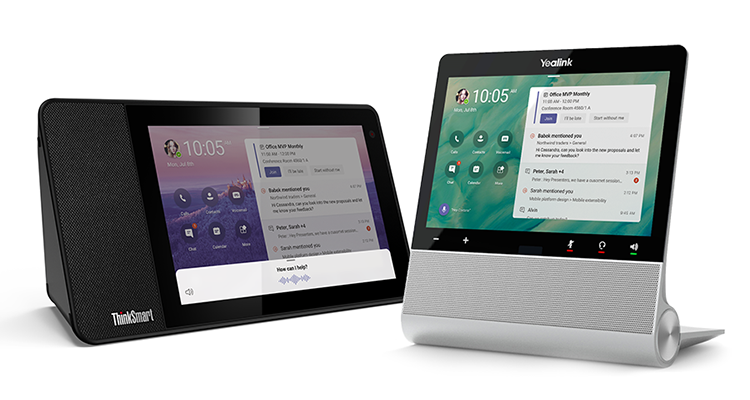

Microsoft has announced new Microsoft Teams displays, a category of all-in-one dedicated Teams devices (basically a personal Teams touch screen) integrated with voice control via Microsoft Cortana. Microsoft is marketing these as personal workspace devices that integrate with Teams collaboration and communication for your home and small office environments — think of them as personal Teams Rooms.
Microsoft Teams displays are always-on displays highlighting important activities and notifications and removing distractions from your primary work device (aka your laptop or computer). You can also personalize your Microsoft Teams displays by changing your wallpaper — and additional personalization options will become available.
Microsoft Teams displays allow you to speak in natural language to join and present in meetings, dictate replies to a Teams chat, etc. You can make requests to Cortana like “What is on my calendar today?”, “Share this document with Megan,” “Join my next meeting,” “Add Joe to this meeting,” “Present the quarterly review deck.”
Here’s a video showing how this works: 
Microsoft Teams displays integrate with your PC to bring a companion experience that allows for cross-device interaction. You can easily lock and unlock both devices from your connected PC, open files or messages, then transition to your PC, and join meetings from either device with a distributed meeting experience across both devices.
Microsoft Teams displays are integrated with enterprise-grade security as well as have personal security options in several ways:
- With a camera shutter and microphone mute switch, users can feel assured that your conversations and video will remain private.
- IT admins can securely manage, update, and monitor Microsoft Teams displays through the Teams admin portal.
- Users will securely sign in with their enterprise Azure Active Directory credentials.
- Voice assistance experiences are delivered using Cortana enterprise-grade services that meet Microsoft 365 privacy, security and compliance commitments.
- With Cortana built-in, the Lenovo ThinkSmart View will be the first Microsoft Teams display to market, with
- Yealink also delivering one of the first devices in this category.